
WordPressで「パンくずリスト」を自動出力させるスクリプト:functions.phpバージョン

Index
― 目次 ―「Breadcrumb NavXT」プラグインで「パンくずリスト」が重複する原因
- WordPressテーマの標準機能と競合している
WordPressテーマに「パンくずリストの標準表示機能」がある場合、テーマと「Breadcrumb NavXT」プラグインの両方でパンくずリストが出力されているため、テーマ側の設定でパンくずリストをオフにします。 - SEOプラグインの構造化データと重複している
画面上は1つしか表示されていなくても、Googleのリッチリザルトなどで構造化データ(JSON-LD)が重複して検出されることがあります。
この場合、All in One SEOプラグインなどの「パンくずリスト(BreadcrumbList)出力機能」が有効になっていないかを確認し、重複している側の構造化データをオフにします(※「All in One SEO」プラグインもしくは「Breadcrumb NavXT」プラグインの構造化データ・JSON-LD出力に関する設定をオフにします)。 - カテゴリー階層の設定が重複している
「Breadcrumb NavXT」プラグインの「投稿階層の表示」のチェックを外し保存します。
●Googleリッチリザルトについて
Googleの検索結果にパンくずリストのリッチリザルトを表示させるには、構造化データ(Schema.org)の記述が必要です。
正しく実装することで、通常のURL表示の部分が「Home > News > Blog > ページタイトル」のように分かりやすい階層表示に変わり、検索ユーザーのクリック率(CRT)向上が期待できます。
※今回作成するスクリプトは、JSON-LD 構造化データの出力に対応させます
「パンくずリスト」の仕様
今回は、「Breadcrumb NavXT」などの「パンくずリスト」プラグインは利用せず、functions.phpで「パンくずリスト」を自動出力させるスクリプトを作成していきます。仕様については、以下のような感じで作りたいと思います。
仕様について- トップページ
トップページでは「パンくずリスト」を出力しない
階層化されたページの「パンくずリスト」を表示させるための設定(トップページのリンクや区切り文字などの設定) - 固定ページ
親子関係も含めて階層化 - カスタム投稿タイプ
カスタム投稿タイプに対応 - 投稿詳細ページ
通常投稿とカスタム投稿に対応 - タクソノミー(カテゴリー)ページ
親子関係を含めて階層化
ターム(カテゴリー)が複数選択されている場合、投稿に紐づくターム(カテゴリー)を1つ取得(表示) - 404ページ
存在しないページ(404)に対応 - JSON-LD 構造化データの出力
Webページの情報を検索エンジンなどのシステムが正確に理解できるようJSON形式でデータ化
スクリプトの参考ソース
「パンくずリスト」を自動出力させるスクリプトは以下のような感じです(※functions.phpに記述してください)。
|
1 2 3 4 5 6 7 8 9 10 11 12 13 14 15 16 17 18 19 20 21 22 23 24 25 26 27 28 29 30 31 32 33 34 35 36 37 38 39 40 41 42 43 44 45 46 47 48 49 50 51 52 53 54 55 56 57 58 59 60 61 62 63 64 65 66 67 68 69 70 71 72 73 74 75 76 77 78 79 80 81 82 83 84 85 86 87 88 89 90 91 92 93 94 95 96 97 98 99 100 101 102 103 104 105 106 107 108 109 110 111 112 113 114 115 116 117 118 119 120 121 122 123 124 125 126 127 128 129 130 131 132 133 134 135 136 137 138 139 140 141 142 143 144 145 146 147 148 149 150 151 152 153 154 155 156 157 158 159 160 161 162 163 164 165 166 167 168 169 170 171 172 173 174 175 176 177 178 179 180 181 182 183 184 185 186 187 188 189 |
// パンくずリストの自動出力設定 function custom_breadcrumb() { // トップページの場合は何も出力しない:パンくずリストなし if (is_front_page() || is_home()) { return; } // トップページの設定 $home = 'Home'; $delimiter = ' > '; // 区切り文字 $before = '<span class="current">'; // 現在のページの手前のタグ $after = '</span>'; // 現在のページの後ろのタグ // 構造化データ用配列 $json_ld_items = array(); $position = 1; // トップページの情報を追加 $json_ld_items[] = array( '@type' => 'ListItem', 'position' => $position++, 'name' => $home, 'item' => home_url('/') ); // トップページのリンクと区切り文字を表示 echo '<a href="' . esc_url(home_url('/')) . '">' . esc_html($home) . '</a>' . $delimiter; // 固定ページ:親 if ( is_page() ) { global $post; if ( $post->post_parent ) { $ancestors = array_reverse(get_post_ancestors($post->ID)); foreach ( $ancestors as $ancestor ) { echo '<a href="' . esc_url(get_permalink($ancestor)) . '">' . esc_html(get_the_title($ancestor)) . '</a>' . $delimiter; $json_ld_items[] = array( '@type' => 'ListItem', 'position' => $position++, 'name' => get_the_title($ancestor), 'item' => get_permalink($ancestor) ); } } // 固定ページ:子 echo $before . esc_html(get_the_title()) . $after; $json_ld_items[] = array( '@type' => 'ListItem', 'position' => $position++, 'name' => get_the_title(), 'item' => get_permalink() ); } // カスタム投稿タイプ:アーカイブ一覧 elseif ( is_post_type_archive() ) { $post_type = get_post_type_object(get_query_var('post_type')); echo $before . esc_html($post_type->label) . $after; $json_ld_items[] = array( '@type' => 'ListItem', 'position' => $position++, 'name' => $post_type->label, 'item' => get_post_type_archive_link($post_type->name) ); } // 投稿詳細:通常投稿 & カスタム投稿 elseif ( is_single() ) { $post_type = get_post_type(); // カスタム投稿の場合:アーカイブへのリンクを表示 if ( $post_type !== 'post' ) { $post_type_obj = get_post_type_object($post_type); $archive_link = get_post_type_archive_link($post_type); if ( $archive_link ) { echo '<a href="' . esc_url($archive_link) . '">' . esc_html($post_type_obj->label) . '</a>' . $delimiter; $json_ld_items[] = array( '@type' => 'ListItem', 'position' => $position++, 'name' => $post_type_obj->label, 'item' => $archive_link ); } } // 紐づくタクソノミー(カテゴリー)を取得 $taxonomies = get_object_taxonomies($post_type, 'objects'); $taxonomy_name = ''; foreach ($taxonomies as $tax) { // 階層を持つタクソノミー(カテゴリータイプ)を優先 if ($tax->hierarchical) { $taxonomy_name = $tax->name; break; } } if ( $taxonomy_name ) { $terms = get_the_terms(get_the_ID(), $taxonomy_name); if ( !empty($terms) && !is_wp_error($terms) ) { // 複数のカテゴリーが選択されている場合:最初の1つ(インデックス 0)をパンくずリストに表示 $term = $terms[0]; // 選択されたカテゴリーに親(祖先)カテゴリーが存在する場合:その親(祖先)カテゴリーを上から順に取得 if ( $term->parent != 0 ) { $ancestors = array_reverse(get_ancestors($term->term_id, $taxonomy_name)); foreach ( $ancestors as $ancestor_id ) { $ancestor = get_term($ancestor_id, $taxonomy_name); echo '<a href="' . esc_url(get_term_link($ancestor)) . '">' . esc_html($ancestor->name) . '</a>' . $delimiter; $json_ld_items[] = array( '@type' => 'ListItem', 'position' => $position++, 'name' => $ancestor->name, 'item' => get_term_link($ancestor) ); } } echo '<a href="' . esc_url(get_term_link($term)) . '">' . esc_html($term->name) . '</a>' . $delimiter; $json_ld_items[] = array( '@type' => 'ListItem', 'position' => $position++, 'name' => $term->name, 'item' => get_term_link($term) ); } } // 記事タイトル echo $before . esc_html(get_the_title()) . $after; $json_ld_items[] = array( '@type' => 'ListItem', 'position' => $position++, 'name' => get_the_title(), 'item' => get_permalink() ); } // カテゴリー・タグ・カスタムタクソノミーのアーカイブ elseif ( is_category() || is_tag() || is_tax() ) { $term = get_queried_object(); $taxonomy = $term->taxonomy; // カスタムタクソノミーの場合:紐づくカスタム投稿タイプのアーカイブリンクを表示 $taxonomy_obj = get_taxonomy($taxonomy); if ( !empty($taxonomy_obj->object_type) ) { $post_type = $taxonomy_obj->object_type[0]; if ( $post_type !== 'post' ) { $post_type_obj = get_post_type_object($post_type); $archive_link = get_post_type_archive_link($post_type); if ( $archive_link ) { echo '<a href="' . esc_url($archive_link) . '">' . esc_html($post_type_obj->label) . '</a>' . $delimiter; $json_ld_items[] = array( '@type' => 'ListItem', 'position' => $position++, 'name' => $post_type_obj->label, 'item' => $archive_link ); } } } // 親ターム(親カテゴリー)を遡る if ( $term->parent != 0 ) { $ancestors = array_reverse(get_ancestors($term->term_id, $taxonomy)); foreach ( $ancestors as $ancestor_id ) { $ancestor = get_term($ancestor_id, $taxonomy); echo '<a href="' . esc_url(get_term_link($ancestor)) . '">' . esc_html($ancestor->name) . '</a>' . $delimiter; $json_ld_items[] = array( '@type' => 'ListItem', 'position' => $position++, 'name' => $ancestor->name, 'item' => get_term_link($ancestor) ); } } // 現在のターム名を表示 echo $before . esc_html($term->name) . $after; $json_ld_items[] = array( '@type' => 'ListItem', 'position' => $position++, 'name' => $term->name, 'item' => get_term_link($term) ); } // 404ページ elseif ( is_404() ) { $title = '404 Not Found'; echo $before . esc_html($title) . $after; $json_ld_items[] = array( '@type' => 'ListItem', 'position' => $position++, 'name' => $title, 'item' => home_url($_SERVER['REQUEST_URI']) ); } // JSON-LD 構造化データの出力 if (!empty($json_ld_items)) { $json_ld = array( '@context' => 'https://schema.org', '@type' => 'BreadcrumbList', 'itemListElement' => $json_ld_items ); echo '<script type="application/ld+json">' . json_encode($json_ld, JSON_UNESCAPED_SLASHES | JSON_UNESCAPED_UNICODE) . '</script>'; } } |
[補足]
「パンくずリスト」の仕様に基づいて作成していますので、コメント箇所をご確認ください。
8~11行目の「トップページの設定」箇所は、必要に応じてご変更ください。
90行目で「複数のカテゴリーが選択されている場合、最初の1つ(インデックス 0)をパンくずリストに表示」させます。
181~188行目は「JSON-LD 構造化データの出力」に関する記述です。
「パンくずリスト」は、以下のように表示されます。
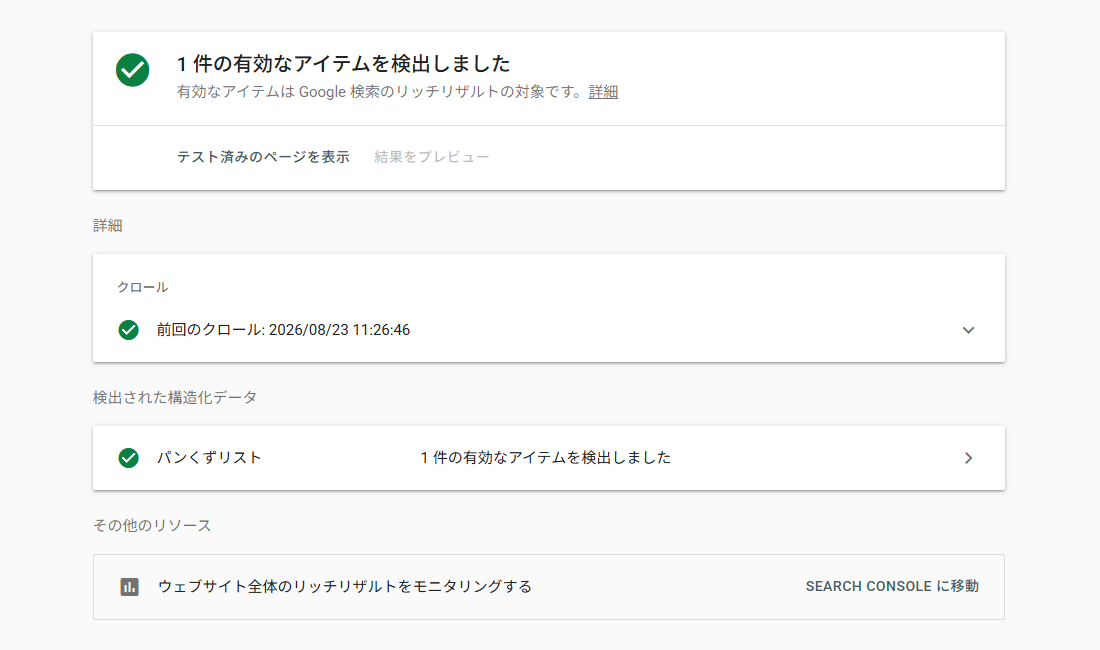
 最後に「Google リッチリザルト テスト」サイトで確認します。
確認したいページのURLを入力してみてください
以下のような画面が表示されていればOKです。
「パンくずリスト」の仕様に基づいて作成していますので、コメント箇所をご確認ください。
8~11行目の「トップページの設定」箇所は、必要に応じてご変更ください。
90行目で「複数のカテゴリーが選択されている場合、最初の1つ(インデックス 0)をパンくずリストに表示」させます。
181~188行目は「JSON-LD 構造化データの出力」に関する記述です。
「パンくずリスト」は、以下のように表示されます。
最後に「Google リッチリザルト テスト」サイトで確認します。確認したいページのURLを入力してみてください
以下のような画面が表示されていればOKです。
テンプレートファイルの参考ソース
パンくずを表示させたいテンプレートファイルに以下を記述します(※single.phpなどのテンプレートファイルに記述してください)。
|
1 2 |
<!-- パンくずリストを表示 --> <?php if ( function_exists( 'custom_breadcrumb' ) ) custom_breadcrumb(); ?> |
[補足]
2行目が「パンくずリスト」を表示するためのコードです。
2行目が「パンくずリスト」を表示するためのコードです。
今回は「WordPressでパンくずリストを自動出力させるスクリプト」についてご紹介しました。
制作時の参考になりましたら幸いです。
 SNSシェア
 関連キーワード
個人的には、利用する必要がないのであれば、プラグインはあまり使いたくはないので、functions.phpで「パンくずリスト」を自動出力させるスクリプトを作成してみましたのでご紹介します。